At the table
No app. No waiter standing there. No wrong order.
The guest scans the code on the table and your menu opens in their browser — photos, prices, what is actually available right now. What they tap is what the kitchen gets, because nobody repeated it in between.
Demo data
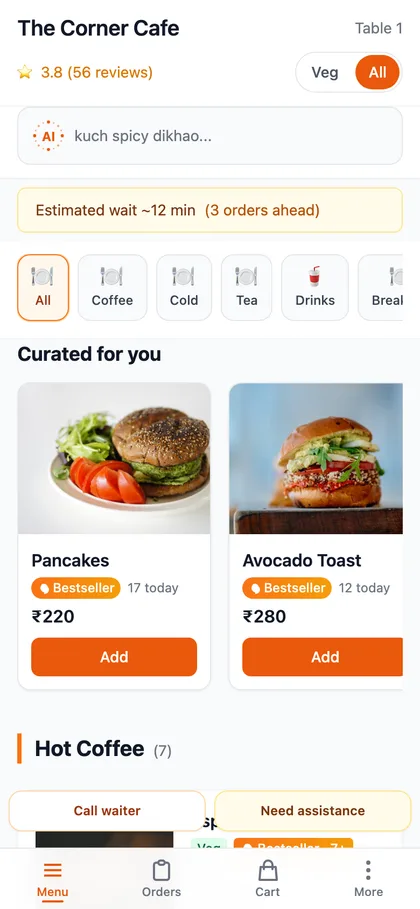
What is actually on their phone
Nothing to install
It is a web page. It opens in whatever browser the phone already has, on a two-year-old Android as readily as a new iPhone.
Their own words on the order
Variants, add-ons, and a note for the kitchen — “no onions”, “extra spicy”, “it is her birthday”. Typed by the person who wants it.
Only what you can actually cook
A dish whose stock has hit zero is already off the menu they are looking at. They never order the thing you have to apologise for.
It suggests the pairing
The upsell sheet offers the drink or the special that goes with what they just added — every table, every order, without anybody having to remember.
A real wait estimate
How long, based on what is actually on the pass right now, not a flat number somebody typed into a settings page once.
They watch it cook
Received, preparing, ready. Nobody has to catch a waiter’s eye to find out where their food is.
What it takes to switch it on
- 01Print the codesOne per table, generated from your dashboard. Table tent, sticker, or on the bill — your call.
- 02They scanPhone camera, no app store, no download prompt. The menu is on screen in about a second.
- 03The kitchen gets itStraight to the kitchen board, and to the thermal printer too if you still want the paper.
- 04You settle itCash, UPI, card or split, from the same spot on your floor map — or they pay online before you get there.
The same menu, four ways
- At the table
- A code per table, and the order lands against that table.
- Takeaway at the counter
- One counter code, a token number instead of a table.
- Delivery
- Your own link, with address, delivery charge and minimum order.
- On a kiosk
- The same menu on a tablet at the counter, with a tip and a token.
Questions people actually ask
What if the guest has no smartphone, or would rather not use it?
Your staff take the order the way they always did — the spot map on the dashboard is a full POS. QR ordering sits alongside it, not instead of it, and both land in the same place.
Do they have to pay online?
No. They can order and pay at the counter or on the table as usual. Online payment is there if you have it configured, and it is their choice either way.
What happens if the wifi drops mid-service?
The kitchen board keeps showing what it already has, and syncs when the connection returns. A guest with no signal cannot place a new order — that is when your staff punch it in for them.
Can two people at the same table order together?
Yes. A group cart with a six-digit join code lets everyone add to one order from their own phone, so it arrives and bills as one table.
See it on your own menu.
Fifteen minutes. We put your menu behind a code and you order from your own phone.