In the store
Stock that moves when you sell, not when someone remembers.
Tell it once what a dish is made of. After that every order — table, counter, kiosk, delivery — takes the ingredients out on its way to the kitchen. What is left for you is four jobs, and the screen tells you which one needs doing today.
Demo data
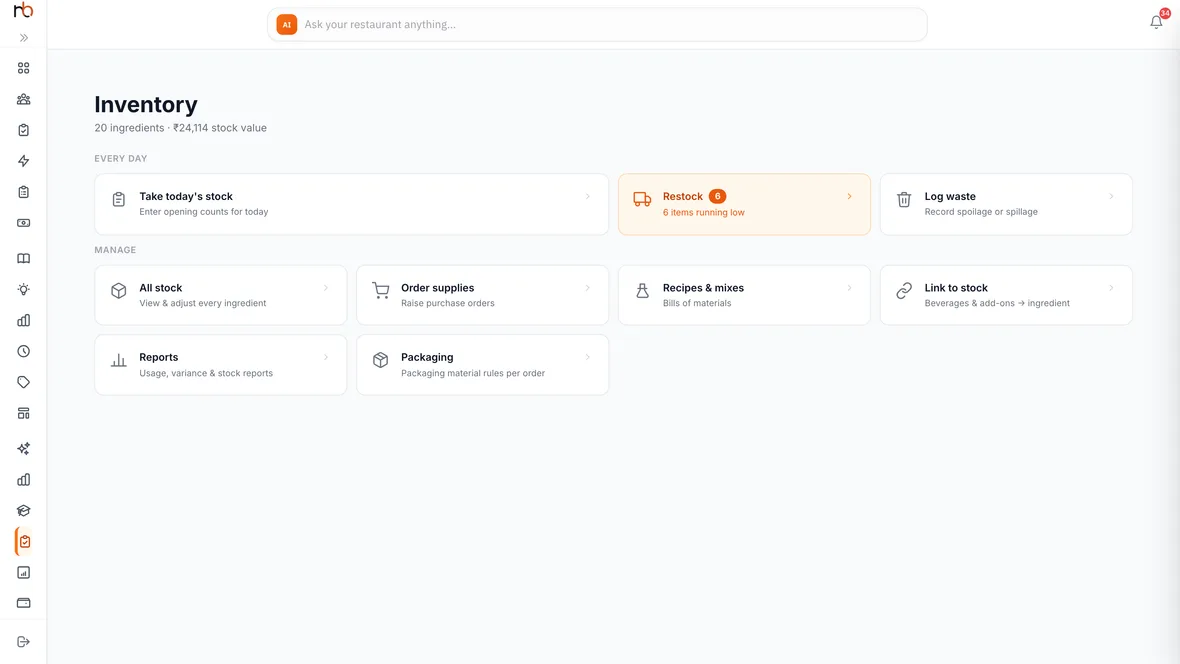
Not ten tabs. The jobs, and which one needs you today
What it actually does between counts
Sales take stock out
A recipe links a dish to its ingredients, and every order that goes to the kitchen deducts them. Nobody has to key the same thing twice.
A dish you cannot cook removes itself
When an ingredient runs out, every dish that needed it goes unavailable — on the guest’s menu, on the dashboard, on the kitchen board — in the same moment. No apology at the table.
Every movement is written down
Purchase, consumption, waste, adjustment, production. Each one is a signed line in a log that only ever gets appended to, so “where did it go” has an answer.
It works out the order for you
Current, par, the shortfall and how much to buy, per ingredient — and separately, what is closest to going off. You are approving a list, not building one.
What the plate costs you
Ingredient prices roll up into a cost per dish and a margin beside it, with the thin ones flagged, so a menu price is a decision rather than a guess.
Override it when the day calls for it
Mark a dish off by hand — for the evening, or until you turn it back on — and your decision sticks. Automatic goes back to automatic when you say so.
Four jobs, not ten tabs
- 01Take today’s stockWalk the store and type what is there, grouped the way the store is. It counts you down — seven of twenty — so a shift that gets interrupted can be picked up rather than restarted.
- 02Sell all dayNobody touches inventory again. Orders deduct as they are punched, from every channel, and a dish that can no longer be made comes off the menu on its own.
- 03RestockThe list is already made: what is under par, by how much, and the quantity to order. Start the purchase order from it.
- 04Log wasteSpoiled, dropped, comped — recorded as waste rather than quietly disappearing into a gap nobody can explain next month.
Behind the four
- Recipes and mixes
- The bill of materials for every dish and every prep, with cost and margin recalculated as ingredient prices move.
- Suppliers and purchase orders
- Who you buy each thing from, at what price, and a receiving step that puts it back on the shelf.
- Link to stock
- Beverages and add-ons pointed straight at an ingredient, for the things that have no recipe worth writing.
- Reports
- Usage, variance and stock reports when you want the whole picture rather than today’s job.
Questions people actually ask
Do we have to write a recipe for every dish before this is useful?
No. Start with the dozen items that move the most and the ingredients that cost the most — that is where the money and the stock-outs are. Dishes without a recipe simply do not deduct; nothing breaks, and you can add the rest whenever.
What happens when the count and the system disagree?
You see both numbers on the same row while you are counting — what it has against what you found — so a gap is obvious in the moment rather than at the end of the month. You say why: wastage, a delivery short, a free pour. That reason is what makes next month’s numbers mean anything.
We buy in kilos but cook in grams. Does that work?
Yes. An ingredient carries the unit you buy it in and its price against that unit; a recipe line can be in the smaller unit and the cost converts.
Will it take a dish off the menu at the worst possible moment?
It takes off dishes it cannot make, which is the moment you would rather find out. If you would rather decide yourself, switch that dish to manual and it stays exactly where you put it.
Bring your top ten dishes.
Fifteen minutes. We link them to ingredients and you watch an order pull stock out.