On the pass
The paper never gets lost if there is no paper.
Orders land on a screen the moment they are placed — from the counter, the table code, the kiosk or your delivery link. How that screen is laid out is your choice, because a cafe making forty coffees an hour and a kitchen running courses do not want the same board.
Demo data
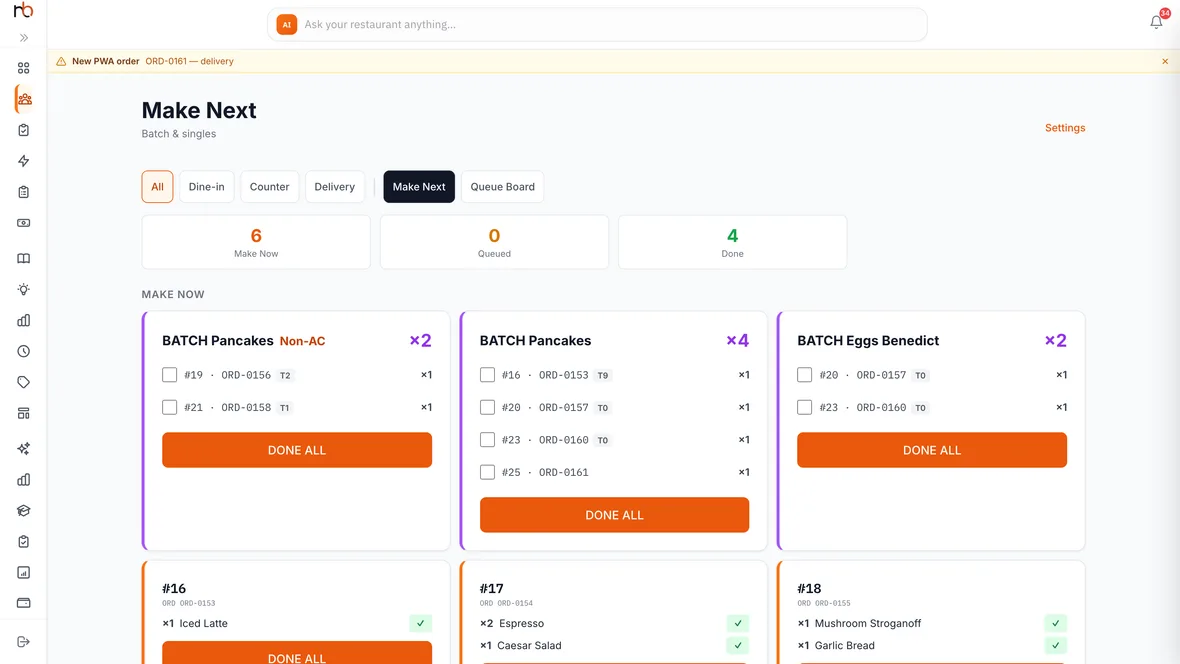
The same dish, grouped across every ticket that needs it. Four Pancakes is one job, not four.
What the board does for you
Tick an item, not a ticket
Each line has its own tick, so a half-done order looks half-done. Done-all is there when the whole thing lands together.
Filtered by where it came from
All, dine-in, counter, delivery. A cafe at the counter and a rider waiting outside are not the same urgency.
The guest sees it move
Received, preparing, ready — the same status the kitchen sets is the one on the guest’s phone. No second system to update.
Age on every ticket
How long it has been sitting, going amber and then red, so the one that slipped is the one you notice.
Reject with a reason
When something genuinely cannot be made, it goes back with a reason attached instead of quietly never arriving.
Paper too, if you want it
Thermal KOTs print alongside the screen — station-tagged, prices stripped, special instructions in inverse. Screens fail; paper is a reasonable belt.
What it runs on
- 01A browserAny tablet, laptop or spare monitor. Most kitchens mount a cheap Android tablet and never think about it again.
- 02No installIt is a URL. Log in once on the kitchen device and leave it open.
- 03On a phone tooThe board has a real phone layout, so the same view works from a handset when you are not at the pass.
- 04Nothing to buyNo proprietary terminal, no per-screen licence.
If you cook in courses
- Waves
- Starters, then mains, then dessert — each wave fired and tracked separately rather than the whole ticket at once.
- Stations
- Name your stations and how many people work each, and the rail can be filtered down to one of them.
- Station-tagged tickets
- Printed KOTs carry the station tag, so the right slip reaches the right section.
Questions people actually ask
What hardware do we need?
Anything with a browser. A tablet on a stand is the usual choice. There is no dedicated terminal to buy and no per-screen charge.
Can we still print kitchen tickets?
Yes, and plenty of kitchens do both. Tickets print through a print agent on a Windows PC or an Android device, over Bluetooth or your network.
What if the kitchen screen goes down mid-service?
Orders keep arriving in the system and on the printer. When the screen comes back it shows everything that is still open — nothing is only ever on the screen.
Can different sections see different things?
Name your stations in settings and the rail can be filtered to one of them, so the person on cold prep is not reading the grill’s list. Printed tickets carry the station tag as well.
Put your menu on a board.
Fifteen minutes. We load your dishes and you see how your pass would actually read.